Watershed Explorer: click any stream, get its catchment (Part 3)
The first two posts built the pieces offline: a depressionless DEM and D8 flow graph, and the inlet points, catchment areas, and the interactive map of all nine plant catchments. The missing piece was interactivity: what about the stream I'm standing next to? The Watershed Explorer answers that for any point on the map.
Click anywhere on the terrain — it snaps to the nearest stream at the selected density, and the full D8 catchment appears shaded, with the downstream pour path drawn to where the water leaves the grid (or reaches a plant inlet). Each click also reports the numbers: catchment area and cell count, elevation, path length, and the hypsometric integral (the 10-point trapezoid estimate of the fraction of the catchment at or above each elevation — the number that turns snowpack readings at different elevations into a total).
What the page lets you do
- Pick any stream. The click snaps in true ground meters (Web Mercator metric distance) to the nearest cell of the stream network, and the server recovers that exact DEM cell — so the blue dot, the red pour path, and the catchment all start from the same cell you saw snap, not from a pixel that was "close enough."
- Choose the stream density with a slider: 0.5, 1, 2, 5, 10, 20, or 50 km² of upstream area. That controls which streams are drawn at all (width and color scale with upstream area on a log scale, so the hierarchy is readable at a glance), and how far your click can snap. Zoom to the valley floor at 50 km² to see only the main stems, or to the high country at 0.5 km² to click a stream smaller than the map's legend can name.
- Blend the base layers. OpenStreetMap tiles sit under a partially transparent elevation-rendered DEM, and two sliders trade which one dominates — streets and place names, or relief. The map view is locked to the DEM extent: you can't pan or zoom into terrain that doesn't exist.
- Read the hypsometric curve. For every catchment the panel draws the curve of fraction of area at or above each elevation (x = 0–100%, y = elevation in meters). A steep-then-flat curve means the catchment is mostly high ground; a gradual one means it's a long, low bowl. The integral under it, H₁₀, is the single number the energy math in the next post will feed snowpack into.
- Take the data with you. "Download this catchment (GeoJSON)" serves the catchment polygon and pour path from the server as a GeoJSON FeatureCollection that loads straight into QGIS; "Download hypsometric data (CSV)" builds the elevation/fraction/percent series client-side so the file always matches the curve on screen.
How it's built
The trick is that nothing heavy happens in the browser, and nothing heavy happens per click either. The heavy work is done once, offline, and the result is frozen on disk.
The terrain is NASA's SRTMGL1 30 m product (Space Shuttle Radar Topography Mission, 2000; collection C2763266360-LPCLOUD via NASA Earthdata, https://www.earthdata.nasa.gov/, granule URLs resolved from the CMR API, https://cmr.earthdata.nasa.gov/), mosaicked and reprojected to a square 30 m grid in UTM zone 10N — the same frozen DEM from Part 1, extended east for a wider working grid of ~13.4 million cells. Barnes' priority-flood sink fill (Part 1) produces the depressionless surface and the pour graph at the same time, and the pour graph is stored as a reverse CSR matrix: for every cell, a flat row of its upstream children. A catchment is then just the transitive closure of that adjacency — a breadth-first walk collecting every descendant of the clicked cell. That walk, plus the statistics, runs in numpy on preloaded arrays and returns in tens of milliseconds.
Two more precomputations keep the click path cheap:
- Stream cells per density level (
.bin, WGS84 float64 with offset encoding) let the browser do the nearest-stream snap entirely client-side — no round trip to find where you clicked, only to ask what drains there. - Rendered overlays (
base.pngfor the DEM,streams_<level>.pngper density) are plain image overlays stretched over the DEM extent, so panning and zooming are free.
The server (a small Flask app, one serve.py mounted at
/p/watershed-explorer/ by the site's project dispatcher) exposes two
JSON endpoints: api/catchment (snap, area, rings, path, hypsometric
series, timings) and api/catchment.geojson (the QGIS-ready
FeatureCollection). The catchment polygon itself is built the honest
way — the cell mask is run-length-boxed per row, the boxes are unioned
with shapely, buffered by 1 m and unbuffered to merge sliver gaps, then
simplified and projected to WGS84 rings. No pixel-art outlines.
The frontend is one index.html with Leaflet: map locked to the DEM
bounds, the two base layers with opacity sliders, the panel with the
density slider, the results readout, the canvas-drawn hypsometric
curve, and the two download buttons. That's the whole app.
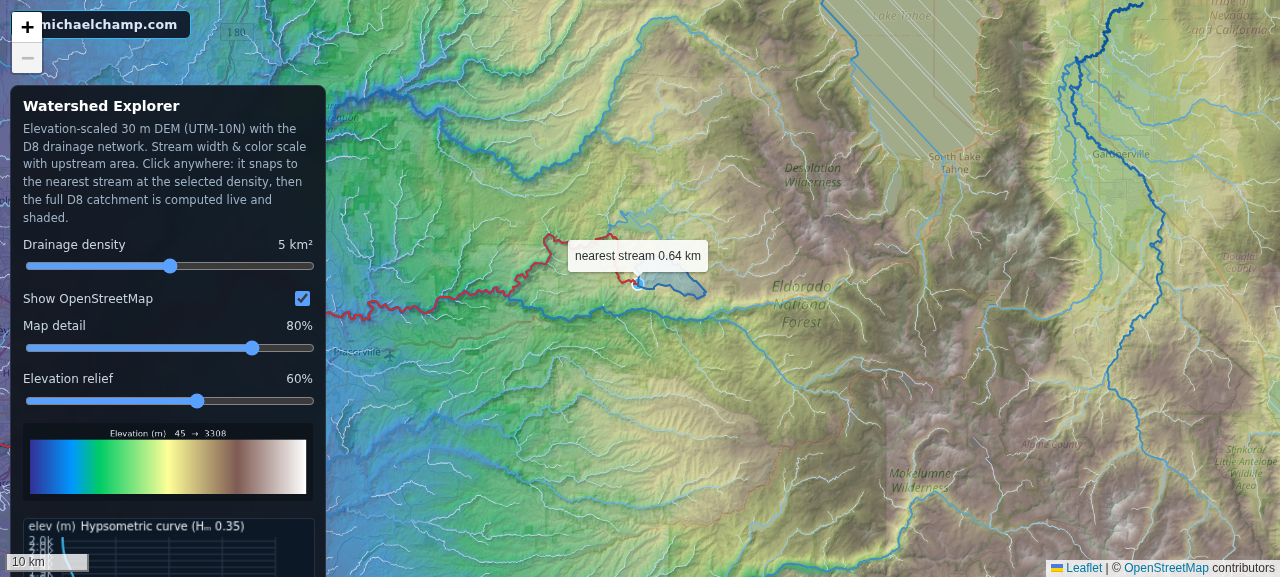
The Explorer with a 23 km² Feather River catchment: shaded polygon, red pour path, results panel, and the hypsometric curve with the H₁₀ integral.
What's next
Part 4 is the energy math from Part 1's roadmap: energy per m³ at each plant (head × turbine efficiency), translating precipitation and SWE into volume through the catchments (where those H₁₀ integrals do the work), converting IDSS forecast gridpoints into total water. Then the last post: the rough dollar value at CAISO NP-15 block-contract pricing, with the caveats that keep it honest (minimum flows, capacity-bypassed dams, real-time vs. block price, ancillary services).